Skip to content

Open source

We publish the prompts and settings behind AI videos made with Sera. Pick a scene you like and make your own with the same settings.

Create a video
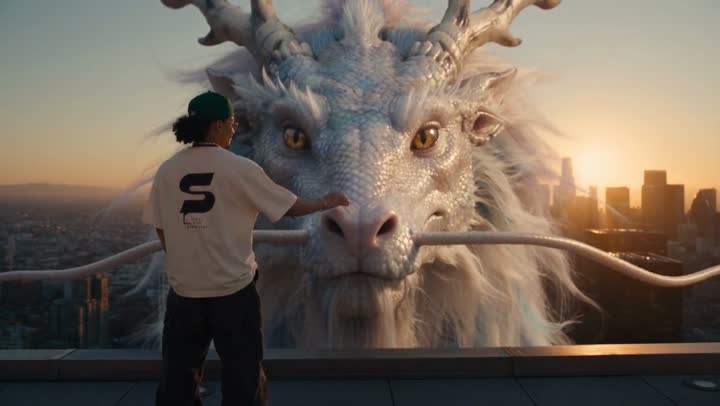
0–4sWhite dragon over the city

Medium-wide shot from behind the rider. He stands alone at the edge of a skyscraper rooftop, hands in his pockets, looking out over the city, the large black S logo on the back of his t-shirt clearly visible.

Hard cut. Wide shot from a neighboring tower. The rider is now seated on the base of the dragon's neck as it dives off the rooftop and plunges between the glass skyscrapers…

Close-up on the rider's face, sunset light glinting on his glasses and pearl necklace, curly hair whipping in the wind, shouting with pure exhilaration…

Extreme wide shot. The dragon bursts up through a layer of golden clouds above the skyline and rises into the open sky, swimming through the air with slow powerful undulations, legs tucked against its body…

Prompts

0:00 / 0:11

Trending

Night drive with a Pomeranian

Model
Genjutsu Light
Resolution
720p
Length
11s
Aspect ratio
Auto
Sound
Yes

Prompt

Motion transfer of the source video. Keep the source video's look exactly: the same dark night background with large soft warm bokeh, the same shallow depth of field, the same hard warm side light with deep black shadows, the same color grade and film grain, and the same real Pomeranian. Do not replace the background and do not brighten the scene. The driver becomes the man in @Image 1. The passenger holding the dog becomes the man in @Image 2, without the straw hat. Each man keeps only his own face, hair and clothes from his own reference image. Both men look like real people filmed on a cinema camera, with real skin texture and real hair. No CGI or 3D render look, no waxy skin, no face paint or scars. Do not render any text or labels from the reference sheets.

Reference videos and images